
• Link to LinkedIn Link to LinkedIn Link to LinkedIn
  • Link to Facebook Link to Facebook Link to Facebook
  • Link to Bluesky Link to BlueskyLink to Bluesky
  • Link to Mastodon Link to MastodonLink to Mastodon
  • Link to Mail Link to Mail Link to Mail
  • Link to Rss Link to Rss Link to Rss
  • CAA Records Become Mandatory in 2027 – Is Your DNS Ready?
Contact us: 01276 818576
Dogsbody Technology
  • Emergency support
  • Infrastructure Services
    • Infrastructure Design
    • Infrastructure Build
    • Server management and monitoring
    • In-life Support
    • Pen Testing & Audit
    • Hosting Services
      • Plesk Hosting
      • VPS & Dedicated Servers
      • Tor Hosting
  • Happy Customers
  • About Us
  • Careers
    • Write your own job
  • News & Views
  • Contact Us
  • Menu Menu

Intel vulnerabilities (Meltdown & Spectre)

16 Jan 2018/1 Comment/in Security/by Dan Benton

On 3rd January 2018 engineers around the world scrambled to respond to the announcement that most CPUs on the planet had a vulnerability that would allow attackers to steal data from affected computers.  Almost two weeks later and we do know a lot more however the outlook is still bleak.

Am I vulnerable?

Almost definitely.  While only Intel CPUs are affected by the Meltdown vulnerability (CVE-2017-5754) CPUs made by AMD, ARM, Nvidia and other manufactures are all affected by the Spectre vulnerabilities (CVE-2017-5753 &  CVE-2017-5715).

Additionally, Spectre is a collection of vulnerabilities.  Only two of the easiest to implement attacks are currently being patched for.  There are literally hundreds of ways to exploit Spectre and many do not have an easy fix. The Spectre collection of vulnerabilities are responsible for the slowdown of CPUs in your computer as they target a major part of the CPU responsible for the speed (speculative execution).

There are a few exceptions for CPUs not affected by these vulnerabilities however so far these have all been low powered ARM devices such as the Raspberry Pi.

It is worth pointing out that while most computers, servers & mobile phones are vulnerable, an attacker would still have to be able to run code on the same CPU you are using in order for you the be affected. For cloud computing providers this is a big issue as the same CPU is being used by many guest systems. For desktop systems this is a problem as most websites nowadays require that browsers run untrusted Javascript.  For dedicated servers being used by one company however, the only code that should be running on the system is trusted code. While this doesn’t make dedicated servers any less vulnerable, it does severely reduce the attack surface.

How does it work?

Better people than us have already covered this.  We recommend these two blog posts…

  • Non-technical overview from Cloudflare.
  • Technical overview from Google Project Zero.

How do I fix this?

You replace your CPU.  Seriously! This is currently the only 100% guaranteed method to be free of these vulnerabilities.  However, that there currently aren’t actually any replacement CPUs that aren’t vulnerable! This issue may speed up some providers depreciation of old technology.

Patches for the Meltdown vulnerability have been made available for all major operating systems now.  Make sure you have installed and rebooted to ensure that the patch is loaded in.

If you are using any sort of virtualisation or cloud infrastructure then make sure that your host is patched too. Most cloud providers are announcing reboots at very short notice.

Patches for the Spectre vulnerabilities are still dribbling out and new patches will likely be required for years to come as new fixes are developed.  The current two Spectre patches include a microcode patch for the actual CPU firmware.  This firmware update should still be shipped out via the standard operating system updates.  These patches will also require systems to be rebooted (again).

But I’m a customer!

Don’t worry, we got you.  We are actively working with all our customers to patch systems and mitigate issues.

Timeline

In tracking these vulnerabilities and writing this blog post we built up a comprehensive timeline of events linking to sources of more information that maybe useful…

  • Between Aug 2016 & Jun 2017 – Multiple vulnerabilities are discovered and published by multiple researchers, mostly building on each others work.
  • 01 Feb 2017 – CVE numbers 2017-5715, 2017-5753 and 2017-5754 are assigned to/reserved by Intel to cover these vulnerabilities.
  • 01 Jun 2017 – The two attack vectors are independently found by Google’s Project Zero researchers and researchers from the academic world which are shared with Intel, AMD and ARM.
  • Sep 2017 – Google deploys fixes in their Linux based infrastructure to protect their customers.  Google proposes to pass the patches upstream to the Linux kernel after the public disclosure of Spectre/Meltdown.
  • 09 Nov 2017 – Intel informs partners and other interested parties under Non Disclosure Agreement (NDA).
  • 20 Nov 2017 – The CRD (Coordinated Release Date) is agreed upon to be 09 Jan 2018 by the parties involved.
  • 13 Dec 2017 – Apple releases iOS 11.2, MacOS 10.13.2 and TVos 11.2. These update contain fixes for Meltdown but that is not mentioned in the release notes.
  • 15 Dec 2017 – Amazon starts sending emails to AWS customers, informing them of a scheduled reboot of EC2 instances on or around the 06 Jan 2018. People that reboot following that email notice degraded performance and start discussing this.
  • 20 Dec 2017 – Jonathan Corbet publishes an article and remarks that the KPTI patches have “all the markings of a security patch being readied under pressure from a deadline”.
  • 01 Jan 2018 – A pythonsweetness post appears, speculating about what’s behind the KPTI patches for the Linux kernel.
  • 02 Jan 2018 – The Register publishes an article that puts enough of the information together.
  • 02 Jan 2018 – Andres Freund posts to the PostgreSQL mailing list showing a 17-23% slowdown in PostgreSQL when using the KPTI patch.
  • 03 Jan 2018 – Google breaks the agreed CRD and makes everything public.
  • 03 Jan 2018 – Two websites are launched to explain the findings.  The vulnerabilities are “officially” named Meltdown and Spectre.
  • 03 Jan 2018 – Microsoft rushes out a series of fixes, including security updates and patches for its cloud services, which were originally planned for a January 9 release.
  • 03 Jan 2018 – Amazon says it has secured almost all of its affected servers.
  • 03 Jan 2018 – Google details its efforts to safeguard its systems and user data.
  • 03 Jan 2018 – Intel acknowledges the existence of the vulnerability, but refutes reports implying it is the only chipmaker affected.
  • 04 Jan 2018 – Media organisations such as the BBC pick up the story.
  • 04 Jan 2018 – Apple confirms its iPhones, iPads, and Macs are affected by the Meltdown and Spectre vulnerabilities.
  • 09 Jan 2018 – Microsoft confirms that patches rolled out to close Meltdown and Spectre security loops have caused PC and server performance slowdowns.
https://www.dogsbody.com/wp-content/uploads/meltdown-spectre.jpg 321 845 Dan Benton https://www.dogsbody.com/wp-content/uploads/Dogsbody-site-logo-1.png Dan Benton2018-01-16 11:33:412018-01-16 11:33:41Intel vulnerabilities (Meltdown & Spectre)

End of Life for New Relic ‘Servers’ – What are your options?

14 Nov 2017/0 Comments/in Security/by Claire Christmas

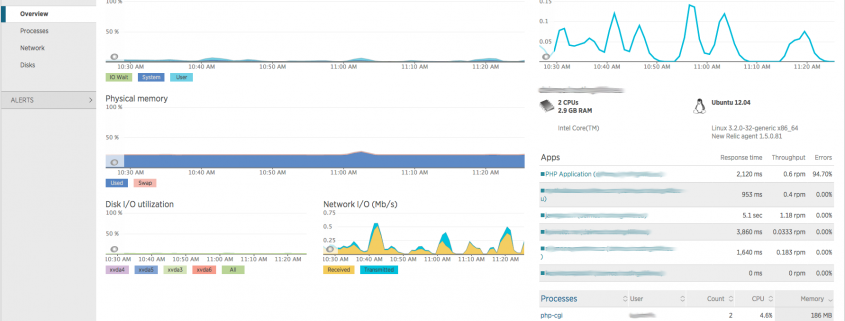
Today (14 Nov 2017) New Relic are making their ‘Alerts’ and ‘Server’ services end of life (EOL). This will impact anyone who used this service to monitor server resources such as CPU, Memory, Disk Space and Disk IO. All existing alert policies will cease from today.

If you rely on these alerts to monitor your servers then hopefully you have a contingency plan in place already but if not below are your options….

If you do nothing

New Relic Servers will go EOL TODAY (14 Nov 2017) and data will stop being collected.  You would no longer be able to monitor your system resources meaning outages that could have otherwise been prevented could sneak up on you. We do not recommend this option.  See below on how to remove the `newrelic-sysmond` daemon.

Upgrade to New Relic Infrastructure

“Infrastructure” is their new paid server monitoring offering. Infrastructure pricing is based on your servers CPU so prices vary and offers added functionality over the legacy New Relic Servers offering.  The maximum price per server per month is $7.20 however the minimum monthly charge is $9.90 so it’s not effective if you’re only looking to monitor your main production system. Most of the new functionality is integration into other products (including their own) so it’s up to you if this additional functionality is useful and worth the cost for your requirements.

Dogsbody Technology Minder

Over the last year we have been developing our own replacement for New Relic Servers using open source solutions. This product has old New Relic Server customers in mind giving all the information needed to run and maintain a Linux server. It also has the monitoring and hooks required to alert the relevant people of issues allowing us to prevent issues before they happen.  This is a paid service but it is included as standard with all our maintenance packages so any customers using New Relic Servers are being upgraded automatically. If you would like further information please do contact us.

Another alternative monitoring solution

There are plenty of other monitoring providers and solutions out there from in-house build your own open source solutions to paid services.  Monitoring your system resources is essential in helping to prevent major outages of your systems. Pick the best one for you and let the service take the hard work out of monitoring your servers.  We have experience with a number of implementations including the TICK stack (Telegraf, InfluxDB, Chronograf, Kapacitor) and Prometheus.

Removing the `newrelic-sysmond` daemon

If you were using New Relic Servers then you are running the `newrelic-sysmond` daemon on your systems.  While New Relic have turned the service off we have confirmed with them that the daemon will keep running using valuable system resources.

We highly recommend that you uninstall the daemon (tidy server tidy mind) following New Relic uninstallation guide.  That way it won’t take much of your system’s resources, and minimal impact is to be expected.


Happy Server Monitoring

If you need help, further advise or to discuss our monitoring solutions please do contact us.

https://www.dogsbody.com/wp-content/uploads/new_relic_servers_overview.png 1035 1783 Claire Christmas https://www.dogsbody.com/wp-content/uploads/Dogsbody-site-logo-1.png Claire Christmas2017-11-14 11:41:252020-11-16 17:10:31End of Life for New Relic ‘Servers’ – What are your options?

Cyber Security Awareness Month 2017

17 Oct 2017/0 Comments/in Security/by Claire Christmas

Dogsbody Technology is happy to be a champion of National Cyber Security Awareness Month (NCSAM) to get everyone thinking about their security online.

Online safety is our shared responsibility, and it starts with STOP. THINK. CONNECT.

STOP: make sure security measures are in place.
THINK: about the consequences of your actions and behaviours online.
CONNECT: and enjoy the internet.

We actively believe that security is not something you “do” (I’ve built this server now I’m going to secure it), it is something that has to be thought about as part of the culture of the business we are in. It is also something that has to be done at all levels of the business including customers and suppliers.

Follow these basic tips throughout October – and all year-round! – to help protect yourself, your information and promote a more trusted internet for everyone.

Own your online presence – Set the privacy and security settings on websites to your comfort level for information sharing. It’s OK to limit how and with whom you share information.

Personal information is like money. Value it. Protect it. – Information about you, such as purchase history or location, has value – just like money. Be thoughtful about who gets that information and how it’s collected by apps and websites.

Keep a clean machine – Keep all software on internet-connected devices – including PCs, smartphones and tablets – up to date to reduce risk of infection from malware.

Get 2 steps ahead – Your usernames and passwords are not enough to protect key accounts like email, banking and social media. Turn on two-factor authentication (2FA) – also known as two-step verification or multi-factor authentication (MFA) – on accounts where available. Two-factor authentication can use anything from a text message to your phone to a token to a biometric like your fingerprint to provide enhanced account security.

Share with care – Think before posting about yourself and others online. Consider what a post reveals, who might see it and how it could be perceived now and in the future.

Declutter your mobile life –  Most of us have apps we no longer use and some that need updating. Delete unused apps and keep others current, including the operating system on your mobile device.

Do a digital life purge –  Perform a good, thorough review of your online files. Tend to digital records, PCs, phones and any device with storage just as you do for paper files. Get started by doing the following:

  • Clean up your email: Save only those emails you really need and unsubscribe to email you no longer need/want to receive.
  • Back it up: Copy important data to a secure cloud site or another computer/drive where it can be safely stored. Password protect backup drives. Always back up your files before getting rid of a device, too. You can’t go wrong with the classic 3-2-1 Backup Strategy -3 total copies of your data, 2 of which are local but on different mediums (read: devices), and at least 1 copy offsite (for if your house/office burns down).

Know what devices to digitally “shred” –  Computers and mobile phones aren’t the only devices that capture and store sensitive, personal data. External hard drives and USBs, tape drives, embedded flash memory, wearables, networking equipment and office tools like copiers, printers and fax machines all contain valuable personal information.

Clear out stockpiles –  If you have a stash of old hard drives or other devices – even if they’re in a locked storage area – information still exists and could be stolen. Don’t wait: wipe and/or destroy unneeded hard drives as soon as possible.

Empty your trash or recycle bin on all devices and be certain to wipe and overwrite – Simply deleting and emptying the trash isn’t enough to completely get rid of a file. Permanently delete old files using a program that deletes the data, “wipes” it from your device and overwrites it by putting random data in place of your information ‒ that then cannot be retrieved.

For devices like tape drives, remove any identifying information that may be written on labels before disposal, and use embedded flash memory or networking or office equipment to perform a full factory reset and verify that no potentially sensitive information still exists on the device.


Most of these suggestions just require time.  There really is no excuse.

https://www.dogsbody.com/wp-content/uploads/Screenshot-from-2017-10-11-14-41-02.png 497 1315 Claire Christmas https://www.dogsbody.com/wp-content/uploads/Dogsbody-site-logo-1.png Claire Christmas2017-10-17 11:04:492017-10-17 11:04:49Cyber Security Awareness Month 2017

Have you been pwned?

7 Sep 2017/0 Comments/in Security/by Claire Christmas

Last week Troy Hunt publicised that a spam list of 711 million user records including email addresses and passwords had been leaked.

“Just for a sense of scale, that’s almost one address for every single man, woman and child in all of Europe.”

Obviously this isn’t the first (and unfortunately) it won’t be the last time data has been breached, however this is one of the biggest by far.

Below we explain why its important to check if your data has been leaked and how to perform those checks.

So why should I care?

One look at the list of Pwned websites (websites that have been breached – which they know about) shows the type of data that has and can be leaked. With every data breach more of your personal data is being leaked and can be pieced together by bad actors to access your online world.

With this data bad actors can perform a number of attacks such as (but not limited to):

  • Phishing  – Attackers now know that you use a service and so have a great advantage when sending you mail pretending to be from that service in an attempt to trick you into sharing sensitive information such as passwords, usernames, and credit card details.  We can all identify spam mail from a bank we don’t use however it’s harder when the sender is someone we know.
  • Password Reuse – A lot of these data breaches involve passwords as well as email addresses.  The first thing that attackers will do is try and log into other accounts using the same login details from the breach. Being aware of what has been released at least give you a fighting chance if you have used the same credentials elsewhere.
  • Whaling / Spear phishing – If you are unlucky enough to have had your data breached a number of times then it is easy for attackers to start to build up a profile for you. Specifically targeted spam e-mails can be sent to you and are much more likely to get past your subconscious mail filter.  These can have life changing outcomes as recent conveyancing scams where thousands have been stolen from individuals has shown.

This week Deliveroo are warning customers over vulnerable passwords and there website hasn’t even been hacked:

“While Deliveroo’s website has not been breached or hacked, the firm has identified a number of customers whose email addresses were compromised in data breaches on other websites.”

How to check if you are affected?

Information is power, not just for the attackers but for you too.  By knowing when you have had a data breach (through no fault of your own) you can protect your brand and your business better.

  • Individual email addresses – Sign up to Have I Been Pwned Notifications to check your email address and get notified if data associated with that e-mail is breached again.
  • Domain owners – Sign up to Have I Been Pwned Domain search to check your domains. Subscribe so that you get notifications should anything else go public in the future.

How can we help?

Being aware of what’s going on with your domain is important as its your online presence to the world.

Dogsbody Technology maintenance packages all include reputation alerts for your IP addresses and domain name/s checking over 200 blacklists to ensure your IP’s aren’t blacklisted or showing up where they shouldn’t. Contact us to find out how we can help protect your brand as well as your servers.

Feature image by bonjourpeewee licensed CC BY-SA 2.0.

https://www.dogsbody.com/wp-content/uploads/DSC_0912.jpg 615 1280 Claire Christmas https://www.dogsbody.com/wp-content/uploads/Dogsbody-site-logo-1.png Claire Christmas2017-09-07 11:04:252017-09-07 11:04:25Have you been pwned?

Stack Clash vulnerability

20 Jun 2017/0 Comments/in Security/by Dan Benton

A new vulnerability was announced today affecting all Linux servers (including OpenBSD, NetBSD, FreeBSD and Solaris, on i386 and amd64).  The vulnerability allows local users to corrupt memory and execute arbitrary code.

We are currently contacting customers to arrange for appropriate times to reboot servers and load in the new kernel. 

If you manage your own server we highly recommend you fully patch and reboot your server ASAP.

If you are using a VPS server you will likely need to wait for confirmation from your VPS vendor that they have made a new kernel available.  Do make sure that when you reboot you boot into the new kernel and not the old one.  We are doing this for customers and have already had replies from some providers.

Anyone using an operating system that is now end of life (such as Ubuntu 12.04) will have to upgrade their operating system.  Some vendors do have additional support offerings.  Canonical is offering Extended Security Support for Ubuntu Advantage customers which will cover this vulnerability.

More technical information can be found in the excellent write up from Qualys who discovered the vulnerability.

“Each program running on a computer uses a special memory region called the stack. This memory region is special because it grows automatically when the program needs more stack memory. But if it grows too much and gets too close to another memory region, the program may confuse the stack with the other memory region. An attacker can exploit this confusion to overwrite the stack with the other memory region, or the other way around.”

If you do not have a support contact in place with us and would like help with this please feel free to contact us.

Feature image by Steven Lilley under the CC BY-SA 2.0 license.

https://www.dogsbody.com/wp-content/uploads/4928251649_193e365b9d_o.jpg 2848 4288 Dan Benton https://www.dogsbody.com/wp-content/uploads/Dogsbody-site-logo-1.png Dan Benton2017-06-20 10:47:052017-06-20 10:47:05Stack Clash vulnerability

How will Ubuntu 12.04 end of life affect me?

12 Jan 2017/1 Comment/in Security/by Rob Hooper

On April 2017, Ubuntu 12.04 reaches end of life (EOL).
We recommend that you update to Ubuntu 16.04.

Over time technology and security evolves, new bugs are fixed and new threats prevented, so in order to maintain a secure infrastructure it is important to keep all software and systems up to date.

Operating systems are key to security, providing the libraries and technologies behind NGINX, Apache and anything else running your application. Old operating systems don’t support the latest technologies which new releases of software depend on, leading to compatibility issues.

Leaving old Ubuntu 12.04 systems past April 2017 leaves you at risk to:

  • Security vulnerabilities of the system in question
  • Making your network more vulnerable as a whole
  • Software incompatibility
  • Compliance issues (PCI)
  • Poor performance and reliability

Ubuntu End of life dates:

Ubuntu LTS (long term support) operating systems come with a 5 year End Of Life policy. This means that after 5 years it receives no maintenance updates including security updates.

  • Ubuntu 12.04 : April 2017
  • Ubuntu 14.04 : April 2019
  • Ubuntu 16.04 : April 2021

Faster:

Just picking up your files and moving them from Ubuntu 12.04 to Ubuntu 16.04 will speed up your site due to the new software.

  • Apache 2.2 -> Apache 2.4
  • MySQL 5.5 -> MySQL 5.6
  • PHP 5.3 -> PHP 7.0

Are you still using an old operating system?

Want to upgrade?

Not sure if this effects you?

Drop us a line and see what we can do for you!


Feature image by See1,Do1,Teach1 licensed CC BY 2.0.

https://www.dogsbody.com/wp-content/uploads/endoftheline-e1467806432495.jpg 546 883 Rob Hooper https://www.dogsbody.com/wp-content/uploads/Dogsbody-site-logo-1.png Rob Hooper2017-01-12 12:37:072019-11-08 16:53:48How will Ubuntu 12.04 end of life affect me?

How will CentOS 5 end of life affect me?

29 Sep 2016/0 Comments/in Security/by Rob Hooper

On 31st March 2017, CentOS 5 reaches end of life (EOL).
We recommend that you update to CentOS 7.

Over time technology and security evolves, new bugs are fixed and new threats prevented, so in order to maintain a secure infrastructure it is important to keep all software and systems up to date.

Operating systems are key to security, providing the libraries and technologies behind NGINX, Apache and anything else running your application. Old operating systems don’t support the latest technologies which new releases of software depend on, leading to compatibility issues.

Leaving old CentOS 5 systems past March 2017 leaves you at risk to:

  • Security vulnerabilities of the system in question
  • Making your network more vulnerable as a whole
  • Software incompatibility
  • Compliance issues (PCI)
  • Poor performance and reliability

CentOS End of life dates:

  • CentOS 5 : 31st March 2017
  • CentOS 6 : 30th November 2020
  • CentOS 7:  30th June 2024

Faster:

Just picking up your files and moving them from CentOS 5 to CentOS 7 will speed up your site due to the newer software.

  • Apache 2.2.3 -> Apache 2.4.6
  • PHP 5.1 -> PHP 5.4
  • MySQL 5.0 -> MariaDB 5.5

Are you still using an old operating system?

Want to upgrade?

Not sure if this effects you?

Drop us a line and see what we can do for you!

Feature image by See1,Do1,Teach1 licensed CC BY 2.0.

https://www.dogsbody.com/wp-content/uploads/endoftheline-e1467806432495.jpg 546 883 Rob Hooper https://www.dogsbody.com/wp-content/uploads/Dogsbody-site-logo-1.png Rob Hooper2016-09-29 11:19:562019-11-08 16:52:00How will CentOS 5 end of life affect me?
HashGate

HashGate: An intrusion detection tool

12 Jul 2016/0 Comments/in Security, Technology/by Alex Last

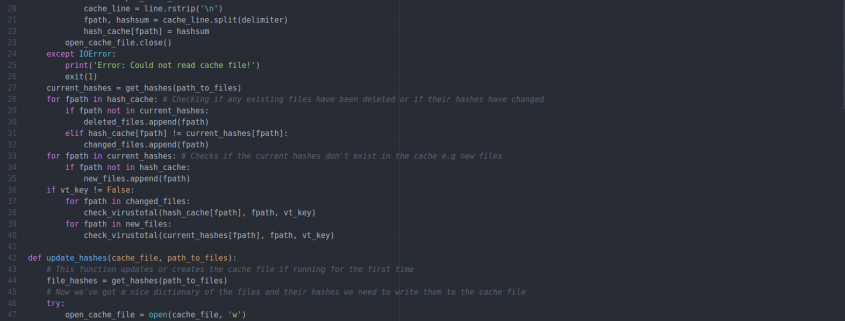
HashGate is a simple intrusion detection tool we wrote for use internally and in customer environments to monitor files and alert us on any unauthorised changes to them.

We try very hard not to re-invent the wheel and are already big users of tools such as Tripwire and Rookit Hunter but we wanted something lightweight for monitoring site files, not system files.

HashGate is written in Python using only core modules and aims to work on all platforms that can run Python 2.7, not just Linux!

Our main use for HashGate is for monitoring files on WordPress & Magento installations which more commonly are exposed to vulnerabilities allowing hackers to modify files. HashGate records the hashsum of all files in the specified directory and stores them for checking periodically, we run our checks hourly via cron.

Below is an basic example output where a file has been modified:


alex@dogsbody-alex:~$ ./hashgate.py -ca /tmp/files.cache -f /home/alex/Documents/Junk/ -t check
The following files were modified:
/home/alex/Documents/Junk/wordpress/index.php
----------------------------------

Other features of HashGate include whitelisting, which allows us to ignore files that frequently change and don’t need to be monitored such as WordPress’ cache files or Magento’s sessions directory.

There is also VirusTotal checking, this is where HashGate will check flagged files hashes against VirusTotal’s database of malicious files to determine if the change was malicious or not. Due to the nature of VirusTotal’s API we’re only able to do 4 requests per minute so if lot’s of files are flagged it will add some extra time to hash checks.

We have recently open sourced this tool and you can find some more information and a list of the full features and usage in the Github repo, if you feel something can be written better or there’s a feature you’d like to add we invite you to contribute and help us build a better tool. We make use of tools like HashGate in some of our server monitoring packages so be sure to check them out and get in contact if they could be of use.

https://www.dogsbody.com/wp-content/uploads/Screenshot-from-2016-07-11-133210.png 868 1641 Alex Last https://www.dogsbody.com/wp-content/uploads/Dogsbody-site-logo-1.png Alex Last2016-07-12 10:33:032016-07-12 10:33:03HashGate: An intrusion detection tool

PHP 5.5 support will stop on the 10 July 2016

8 Jul 2016/0 Comments/in Security/by Rob Hooper

Quick Public Safety Announcement, PHP 5.5 is end of life (EOL) on the 10 July 2016.

Anything not running PHP version 5.6 or newer exposes your site to significant security vulnerabilities.

We have ensured that all our customers are safe and ready. Unsure if you are affected? Want a hand upgrading? Get in touch!


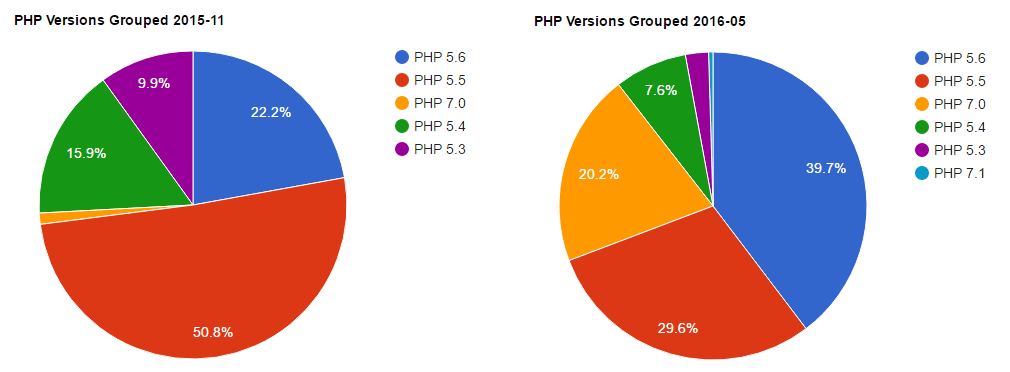
composer-PHP-usage-chart-2016-01

I am a big fan of graphs, Jordi Boggiano has provided this is a great overview of the PHP versions out there in the wild!

We are very happy to see a big drop in PHP 5.3 and 5.4 since they have long passed end of life and a surprisingly quick rise in the brand new PHP 7.0. 🙂


Feature image by See1,Do1,Teach1 licensed CC BY 2.0.

https://www.dogsbody.com/wp-content/uploads/endoftheline-e1467806432495.jpg 546 883 Rob Hooper https://www.dogsbody.com/wp-content/uploads/Dogsbody-site-logo-1.png Rob Hooper2016-07-08 16:32:422019-11-08 16:51:49PHP 5.5 support will stop on the 10 July 2016

DROWN vulnerability

1 Mar 2016/0 Comments/in Security/by Rob Hooper

Dogsbody Technology maintenance customers are already protected against the newly disclosed DROWN attack, but as of the 1st March, 33% of all HTTPS sites are affected by this vulnerability.

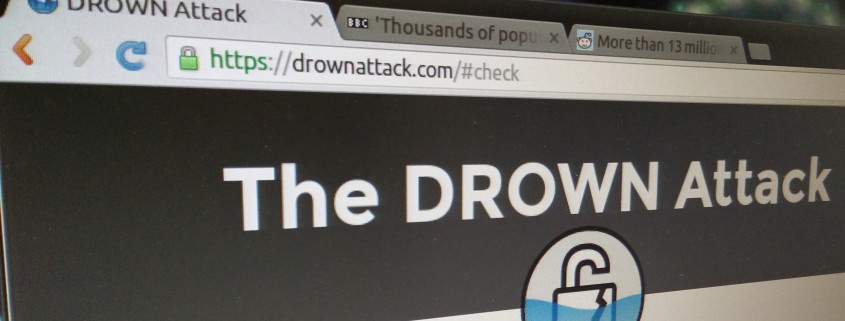
The DROWN (Decrypting RSA with Obsolete and Weakened eNcryption) vulnerability affects HTTPS and other services that rely on SSL and TLS, these cryptographic protocols that make security over the Internet possible.

The attack affects all SSLv2 servers and allows attackers to decrypt HTTPS traffic during transfer letting them spy on traffic. In some cases encryption can be broken within minutes!

The fix web servers is to disable SSLv2 support:

  • For Apache: SSLProtocol all -SSLv2 -SSLv3
  • For Nginx: ssl_protocols TLSv1 TLSv1.1 TLSv1.2;

For more information on the attack and research paper take a look at the official DROWN Attack website.

Dogsbody Technology are Linux SysAdmin’s, building secure scalable reliable servers for the internet. We keep our servers up-to date and in doing so have already mitigated this attack.

If you want your site checked or have any questions please contact us.

https://www.dogsbody.com/wp-content/uploads/TheDrownAttack-e1457092838437.jpg 2069 3775 Rob Hooper https://www.dogsbody.com/wp-content/uploads/Dogsbody-site-logo-1.png Rob Hooper2016-03-01 12:46:342016-03-01 12:46:34DROWN vulnerability
Page 4 of 512345

We are Dogsbody. We take the pain away from building, securing and maintaining IT infrastructure.

Find out how we can help your business

Everything we do is about security. Our team is our strength.

Get in touch

Latest thoughts and news

  • CAA Records Become Mandatory in 2027 – Is Your DNS Ready?
  • Our Trusted Suppliers after 15+ Years
  • Avoid Surprise AWS RDS Charges in 2026
  • A Season of Giving: Dogsbody Technology Charity Support 2025
  • Wrapping Up 2025: Our Christmas Hours
Search Search

Useful links

  • About Us
  • Dogsbody News & Views
  • Contact Us

Linux & cloud services

  • Infrastructure Design
  • Infrastructure Build
  • In life Support
  • Infrastructure Audit
  • Penetration Testing
  • Hosting Services

In life support

  • Overview
  • Helpdesk support
  • Server management and monitoring

Careers

  • Working at Dogsbody
  • Write your own job description
© Copyright 2010-2026 Dogsbody Technology Ltd - Registered in England and Wales 07236558
  • Link to LinkedIn Link to LinkedIn Link to LinkedIn
  • Link to Facebook Link to Facebook Link to Facebook
  • Link to Bluesky Link to BlueskyLink to Bluesky
  • Link to Mastodon Link to MastodonLink to Mastodon
  • Link to Mail Link to Mail Link to Mail
  • Link to Rss Link to Rss Link to Rss
  • Contact us
  • Terms of use
  • Privacy policy
Scroll to top Scroll to top Scroll to top