
• Link to LinkedIn Link to LinkedIn Link to LinkedIn
  • Link to Facebook Link to Facebook Link to Facebook
  • Link to Bluesky Link to BlueskyLink to Bluesky
  • Link to Mastodon Link to MastodonLink to Mastodon
  • Link to Mail Link to Mail Link to Mail
  • Link to Rss Link to Rss Link to Rss
  • CAA Records Become Mandatory in 2027 – Is Your DNS Ready?
Contact us: 01276 818576
Dogsbody Technology
  • Emergency support
  • Infrastructure Services
    • Infrastructure Design
    • Infrastructure Build
    • Server management and monitoring
    • In-life Support
    • Pen Testing & Audit
    • Hosting Services
      • Plesk Hosting
      • VPS & Dedicated Servers
      • Tor Hosting
  • Happy Customers
  • About Us
  • Careers
    • Write your own job
  • News & Views
  • Contact Us
  • Menu Menu

CAA Records Become Mandatory in 2027 – Is Your DNS Ready?

14 Jul 2026/0 Comments/in Security/by Claire Christmas

In May 2026, the CA/Browser Forum voted to make Certificate Authority Authorization (CAA) checking mandatory for publicly trusted Certificate Authorities from 2027.

For many organisations this won’t require any action. However, for businesses using automated certificate management – particularly with Let’s Encrypt – it’s worth understanding what this change means before it catches anyone out.

A Quick Refresher: What is a CAA Record?

A CAA (Certificate Authority Authorization) DNS record tells Certificate Authorities (CAs) which organisations are permitted to issue TLS certificates for your domain.

For example:

example.com.    IN CAA 0 issue "letsencrypt.org"

This tells Certificate Authorities that only Let’s Encrypt is authorised to issue certificates for example.com.

If no CAA record exists, the current behaviour is effectively:

“Any publicly trusted CA may issue a certificate.”

That’s why many organisations have never needed to think about CAA records.

What’s Changing?

The CA/Browser Forum has voted to strengthen the use of CAA from 2027.

CAA checking already exists today, but the new requirements mean Certificate Authorities will be expected to rely on CAA records much more consistently as part of certificate issuance.

While this is a positive security improvement, it does introduce a few practical considerations.

Potential Issue #1: Not Every DNS Provider Supports CAA

Most modern DNS providers support CAA records, but not all do.

If your DNS platform cannot publish CAA records, you may find yourself limited as Certificate Authorities tighten their issuance processes over the coming years.

For organisations using older hosting providers or bundled DNS services, it’s worth checking support now rather than during an emergency certificate renewal.

Potential Issue #2: CAA Records Can Accidentally Break Other Certificates

This is the one that catches people out.

Suppose you add:

CAA 0 issue "letsencrypt.org"

to support your Let’s Encrypt certificates.

That doesn’t simply “enable” Let’s Encrypt.

It also says only Let’s Encrypt is allowed to issue certificates for your domain.

If another team later requests a certificate from DigiCert, Sectigo, GlobalSign, or another public CA, issuance will fail.

This often happens in organisations where:

  • Internal systems use Let’s Encrypt.
  • Microsoft 365 or other SaaS platforms obtain certificates through another CA.
  • External suppliers manage certificates independently.
  • Different departments purchase certificates from different providers.

Without coordination, a well-intentioned CAA record can become an unexpected roadblock.

Similar to SPF

CAA records have a lot in common with SPF records for email.

No SPF record generally means:

“No restrictions.”

Adding an SPF record suddenly defines who is allowed to send mail.

CAA works in much the same way.

No CAA record means:

“Any trusted Certificate Authority may issue a certificate.”

Once you add one, you’re explicitly defining who can.

What Should You Do?

There’s no need to panic, but this is a good opportunity to review your certificate management.

Ask yourself:

  • Which Certificate Authorities do we currently use?
  • Do all of our domains use the same CA?
  • Does our DNS provider support CAA records?
  • Are certificates requested by different teams or third-party suppliers?

Understanding the answers now will make any future transition considerably smoother.

Our Advice

For many small and medium-sized businesses, certificate management has become almost invisible thanks to automation.

That’s a good thing – until a small DNS change unexpectedly prevents a certificate from renewing.

Before adding CAA records, make sure you have a complete picture of every service that requests certificates for your domains. A single restrictive CAA record can have wider consequences than many people realise.

If you’re unsure how your domains are currently managed, now is a good time for a review. It’s much easier to make these changes on your own schedule than during an expired certificate incident.

For anyone wanting a refresher on CAA records, Let’s Encrypt has an excellent overview.

Need Help

Not sure how to navigate this change? Contact us

 

https://www.dogsbody.com/wp-content/uploads/PHP-8.2-December-2026_3-months.jpg 427 640 Claire Christmas https://www.dogsbody.com/wp-content/uploads/Dogsbody-site-logo-1.png Claire Christmas2026-07-14 17:03:122026-07-14 17:03:12CAA Records Become Mandatory in 2027 – Is Your DNS Ready?

Avoid Surprise AWS RDS Charges in 2026

24 Mar 2026/0 Comments/in Security/by Claire Christmas

From 31 Jul 2026 Amazon Web Services (AWS) will automatically start charging anyone using RDS MySQL 8.0 Community Edition for “Extended Support”. Your monthly database costs could increase significantly (in many cases close to double).

TL;DR

  • MySQL 8.0 goes End of Life (EOL) In April 2026
  • From 31 Jul 2026 AWS will start charging extra for “Extended Support”
  • There are options, you don’t have to upgrade to MYSQL 8.4

What Happens When AWS RDS MySQL 8.0 Reaches End of Life?

  • AWS automatically enrols your RDS MySQL 8.0 instance into Extended Support
  • Additional charges are added to your monthly AWS bill
  • Security updates continue for up to 3 more years
  • No automatic optimisation or performance improvements

This is primarily a commercial decision by AWS, not a technical upgrade.

Your Options

Option 1: Do Nothing and Pay for Extended Support

This is the default outcome if no action is taken and there is nothing wrong with it. AWS will automatically upgrade your instance to Extended Support.

Pros

  • No work required
  • Continued security patches
  • Supported until approximately July 2029

Cons

  • Higher monthly costs
  • No technical benefit
  • Unnecessary operational spend

For cost-conscious businesses, this is rarely the best long-term choice.

Option 2: Upgrade to MySQL Community 8.4

Move to MySQL Community 8.4, which is supported until 31 July 2029.

Pros

  • Avoid Extended Support charges
  • Remain on community MySQL

Cons

  • Requires application compatibility testing
  • Potential query or driver differences
  • Requires Developer time and regression testing

Option 3: Move to Aurora MySQL 8.0 (Best of both worlds)

For most organisations, the most cost-effective and lowest-risk option is to migrate to Amazon Aurora MySQL 8.0. 

Aurora is AWS’s MySQL-compatible database engine. It is fully compatible with MySQL 8.0, and for most applications behaves identically.

Aurora MySQL 8.0 is supported until 30 April 2028, without Extended Support charges.

Why this is attractive:

  • 100% MySQL 8.0 compatible
  • Avoids 2026 Extended Support price increases
  • Often improved performance and storage resilience
  • Potential for zero-downtime migration (dependant on data etc)

Warning: MySQL community reserved instances are not compatible with Aurora MySQL reserved instances. You will have to calculate if this is worthwhile for you as there maybe options to transfer your reservations.

Why SMEs Should Plan Now

  • Avoid sudden AWS bill increases in 2026
  • Schedule migration during low-risk periods
  • Controlled testing window
  • Maintain predictable cloud operating costs
  • Avoid rushed engineering decisions

Leaving this until mid-2026 could result in rushed decisions, increased costs, or unnecessary operational risk.

Summary: Best Path for AWS RDS MySQL Users

Option Cost Impact Risk Recommendation
Do nothing Higher None Expensive long term
Upgrade to 8.4 Neutral Moderate testing required Viable
Move to Aurora 8.0 Neutral Very low Recommended

Need Help With an AWS RDS to Aurora Migration?

We are a UK-based Linux and AWS consultancy specialising in:

  • AWS RDS optimisation
  • Aurora MySQL migrations
  • Zero-downtime database cutovers
  • Cost reduction and cloud optimisation for SMEs

If you would like a review of your current AWS RDS MySQL estate and projected 2026 cost exposure, contact us.

Frequently Asked Questions

Will AWS automatically upgrade my RDS MySQL 8.0 instance?
Yes. After 31 July 2026, AWS will automatically enrol your instance into Extended Support unless you migrate or upgrade beforehand.

Is Aurora MySQL fully compatible with MySQL 8.0?
Yes. Aurora MySQL 8.0 is designed to be fully compatible with MySQL 8.0 Community Edition.

Can the migration be done with zero downtime?
In most cases, yes. Using replication and controlled cutover techniques, downtime can be reduced to seconds or avoided entirely.

How long does an RDS to Aurora migration take?
Typically a few days including testing, depending on database size and complexity.

https://www.dogsbody.com/wp-content/uploads/geralt-cost-1174926_640.jpg 426 640 Claire Christmas https://www.dogsbody.com/wp-content/uploads/Dogsbody-site-logo-1.png Claire Christmas2026-03-24 11:02:122026-05-18 12:06:58Avoid Surprise AWS RDS Charges in 2026
PHP 8.1 will go end of life - 31 Dec 2025

PHP 8.1 will go end of life – 31 Dec 2025

8 Aug 2025/0 Comments/in Security/by Claire Christmas

PHP 8.1 End of Life – Act Now

PHP 8.1 goes end of life on the 31 December 2025. After this date, known security flaws will no longer be fixed, leaving your sites exposed to significant security vulnerabilities.

It is important to update to a newer version of PHP. We recommend upgrading to one of the latest supported versions — all of which include new features and backward-incompatible changes that should be thoroughly tested before deployment in a production environment.

You may need to ask your developers to update your codebase, verify plugin compatibility, and ensure your applications are supported on newer PHP versions.

Supported PHP Versions:

  • PHP 8.2: Supported until 31 December 2026 
  • PHP 8.3: Supported until 31 December 2027
  • PHP 8.4: Supported until 31 December 2028  (Note: PHP 8.4 is still in Beta Support for WordPress and may not be fully compatible yet.)

Want to find out what your options are and what actions you need to take to stay secure. We can help just

Not sure which PHP version your server is using?
It might be time for a Server Audit to get a complete view of your infrastructure. We provide a traffic light report that highlights the good, the bad, and the ugly.

Want to know your options and what actions you need to take to stay secure?
We can help – just get in touch.

https://www.dogsbody.com/wp-content/uploads/PHP81EOL-e1753181148767.jpg 323 528 Claire Christmas https://www.dogsbody.com/wp-content/uploads/Dogsbody-site-logo-1.png Claire Christmas2025-08-08 11:34:412025-08-08 11:34:41PHP 8.1 will go end of life – 31 Dec 2025

5 options for Ubuntu 20.04 EOL in April 2025

27 Sep 2024/0 Comments/in Security/by Claire Christmas

Ubuntu 20.04 goes End Of Life (EOL) in April 2025. When an operating system goes EOL there is usually a lot to think about so lets break down the options open to you.

  1. Do nothing
  2. Build new infrastructure (and move to the latest Ubuntu LTS release)
  3. Perform an in-place upgrade
  4. Buy an annual subscription to Ubuntu Pro – Extended Security Maintenance (ESM) – UPDATED 12 Nov 2024
  5. Just shut it down

Lets explore the pros and cons of each option.

1) Do Nothing (Not Recommended) See hear and speak no evil monkey statues

By far the easiest of the options but could end up costing you more in the long run. We do not recommend this option.

Doing nothing mean you have a ticking time bomb on your infrastructure. Your infrastructure will no longer receive security updates for the Ubuntu base OS, critical software packages and infrastructure components as well as no security maintenance for high and critical CVEs. This will probably also cause Compliance issues (PCI), Software incompatibility and make your whole network more vulnerable.

Using this option will also mean that more work will be required when you upgrade your server in the future costing you more.

2) Build new infrastructure (and move to the latest Ubuntu LTS release)

Clipart image of a trophyDogsbody always recommend this options as a clean and safe way to upgrade. It allows you to upgrade your hardware to the latest tech. (Suppliers may allow you a free cut over period to manage costs).


This options lets everyone involved test things fully without affecting production infrastructure .

Obviously the disadvantage is this is it is one of the more expensive options, not just because of the work involved but as you may have to pay for two set of hardware and support etc until you migrate from your old to your new infrastructure. Dogsbody offer a one month cross over period for all our maintenance customers 🙂 Also if you have multiple sites on the server (shared hosting) you need to update all sites to the new IP.

Ubuntu 24.04 LTS became available in April 2024 and is supported for 5 years with the end of their standard support in June 2029. We recommend installing the 22.04.1 release especially for production machines.

3) Perform an in-place upgrade

This may only be an option for certain infrastructure types. It can be cheaper than option 2 (and quicker) but only if it upgrades perfectly. This option gives you zero testing time which means there is a risk that this will not work and your infrastructure will be off line whilst you or your support services fix it live.

While in-place upgrades will result with you having a new operating system, you will likely inherit the (less secure) defaults from the old operating system. A great example of this is when the default changed in SSH to disable the insecure v1 of the protocol on new operating system installs. Systems that were upgraded via in-place upgrade would inherit the old config keeping SSH v1 turned on.

We would certainly never recommend more than one in-place upgrade. Taking a single system from Ubuntu 16.04 -> 18.04 -> 20.04 and now 22.04 is a bad idea as it just leaves too many loose threads.

It also means your hardware will not be upgraded keeping you potentially on old, less efficient hardware that may also cause you issues at a later date.

4) Buy an annual subscription to Ubuntu Pro – Extended Security Maintenance (ESM) – UPDATED 12 Nov 2024

Extended Security Maintenance (ESM) and Ubuntu Pro are annual subscriptions. They provide Security updates for Ubuntu LTS for an additional 5 years (until April 2030 for Ubuntu 20.04). Including security coverage of the Main and Ubuntu Universe repositories for Critical, High and select Medium CVEs.

The disadvantages with this option Ubuntu Pro will not cover software from other repositories. If you have installed other software (Nginx, Percona, etc.) from their own official repositories then these repo’s may decide to drop support for your operating system as it’s now deemed to be EOL. We have seen this happen multiple times so unfortunately isn’t the panacea for all Ubuntu users.

Additionally, as with the in-place upgrade, it also means your hardware will not be upgraded keeping you potentially on old, less efficient hardware that may also cause you issues at a later date.

After a extensive discussion with Canonical we finally have a solution for getting Ubuntu Pro on smaller public cloud provider such as Linode, Digital Ocean, Vultr etc.

Ubuntu Pro is an enterprise subscription charged per machine per year. If Ubuntu Pro is something you are interested in please contact us.

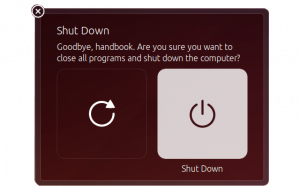
5) Just shut it downThe Ubuntu shutdown screen

It’s good to take stock of your infrastructure sometimes, especially internal/pet projects that may have been left to languish.

Do you actually still need this infrastructure? Has it been replaced by something better? If so then you can always just shut it down.

We had customer who reviewed their hosting infrastructure and made the decision to moving their final customer websites to our shared hosting platform which saved them both time and money.

About Ubuntu 24.04

Ubuntu 24.04 LTS release is supported for 5 years with the end of their standard support in June 2029.

Upgrading from Ubuntu 20.04 to Ubuntu 24.04 should, instantly, speed up your sites/infrastructure if you get it right.

It’s worth considering package changes between operating system versions. Some of the most common are…

  • Apache 2.4.52 -> Apache 2.4.58
  •  PHP 8.1.2 (default) -> PHP 8.3.6
  • Nginx 1.24
  • The docker.io package is version 24.0.7

More info in the Noble Numbat Release Notes.

Dogsbody have a lot of customers who run Ubuntu 20.04 who we will be advising and helping move to the best option for their business. If you need help on deciding the best route for your upgrade or more information about getting Ubuntu Pro for smaller public cloud provider please do contact us.

https://www.dogsbody.com/wp-content/uploads/animal-4070485_1280.jpg 853 1280 Claire Christmas https://www.dogsbody.com/wp-content/uploads/Dogsbody-site-logo-1.png Claire Christmas2024-09-27 16:41:012024-11-12 11:57:195 options for Ubuntu 20.04 EOL in April 2025

TLD’s affected by CentralNic Registry authCode reset

22 Apr 2024/0 Comments/in Security/by Dan Benton

CentralNic Registry was recently informed of a security issue with one of its third-party vendors. There’s no evidence of a compromise or any unauthorised access however there is a risk that domain authCode’s have been leaked.

A domain auth code can be used to steal a domain from you.

Any domain owners of the following TLD’s are advised to reset the authCode for their domain.

Some registrar’s are batch voiding and regenerating auth codes for affected domains but not all.

Affected TLD’s

gTLDs

  • .art
  • .bar
  • .basketball
  • .best
  • .college
  • .ceo
  • .design
  • .fans
  • .feedback
  • .frl
  • .fun
  • .gent
  • .host
  • .icu
  • .ink
  • .love
  • .observer
  • .online
  • .ooo
  • .press
  • .protection
  • .realty
  • .reit
  • .rent
  • .rest
  • .security
  • .site
  • .space
  • .storage
  • .store
  • .tech
  • .theatre
  • .tickets
  • .website
  • .wiki
  • .xyz

Official ccTLDs

  • .bh, Bahrain
  • .fm, Federated States of Micronesia
  • .fo, Faroe Islands
  • .gd, Grenada
  • .gl, Greenland
  • .la, Laos; also borrowed for Los Angeles
  • .pw, Palau
  • .sk, Slovakia
  • .vg, British Virgin Islands

Unofficial ccTLDs

  • .ae.org, for United Arab Emirates
  • .ar.com, Argentina
  • .br.com, Brazil
  • .cn.com, China
  • .com.de, Germany
  • .de.com, Germany
  • .eu.com, European Union
  • .gb.com, Great Britain
  • .gb.net, Great Britain
  • .gr.com, Greece
  • .hu.com, Hungary
  • .jpn.com, Japan
  • .jp.net, Japan
  • .kr.com, Korea
  • .no.com, Norway
  • .qc.com, Quebec
  • .ru.com, Russia
  • .sa.com, Saudi Arabia
  • .se.com, Sweden
  • .se.net, Sweden
  • .uk.com, United Kingdom
  • .uk.net, United Kingdom
  • .us.com: United States
  • .us.org: United States
  • .uy.com, Uruguay
  • .za.com, South Africa

Any domain owners of these TLD’s are advised to reset the authCode for that domain.


https://www.dogsbody.com/wp-content/uploads/marketing-3740526_640.jpg 463 640 Dan Benton https://www.dogsbody.com/wp-content/uploads/Dogsbody-site-logo-1.png Dan Benton2024-04-22 12:08:102024-04-22 12:08:26TLD’s affected by CentralNic Registry authCode reset

PHP 8.0 will go end of life – 26 Nov 2023

17 May 2023/0 Comments/in Security/by Claire Christmas

PHP 8.0 goes end of life on the 26 November 2023. Known security flaws will no longer be fixed and sites are exposed to significant security vulnerabilities.

It is important to update them to a newer version. We would recommend updating to either:

  • 8.1 supported until 25 November 2024
  • 8.2 supported until 08 December 2025

This new minor version brings with it a number of new features and a few incompatibilities that should be tested for before switching PHP versions in production environments.

You may need to get your developers to update code, check plug-ins and app versions for supportability:

  • Deprecated Features when migrating from 8.0.x to PHP 8.1.x

WordPress is still only showing “beta support” for anything PHP 8.0 or above, as WordPress say:

WordPress is not fully compatible with PHP 8.0 or 8.1. All remaining known PHP 8.1 issues are deprecation notices.

Please note, a deprecation notice is not an error, but rather an indicator of where additional work is needed for compatibility before PHP 9 (i.e. when the notices become fatal errors). With a deprecation notice, the PHP code will continue to work and nothing is broken.

At the time of writing PHP 8.2 for wordpress was still waiting on the dev notes.

Not sure what version your server is on? Maybe it’s time for a Server Audit so you have a full picture of your infrastructure – We produce a traffic light report telling you the good, the bad and the ugly…

Want a hand with your PHP upgrade? Get in touch!

https://www.dogsbody.com/wp-content/uploads/PHP-80-EOL.jpg 1080 1920 Claire Christmas https://www.dogsbody.com/wp-content/uploads/Dogsbody-site-logo-1.png Claire Christmas2023-05-17 13:31:222023-05-17 13:31:22PHP 8.0 will go end of life – 26 Nov 2023

Three Easy Ways To Secure Your WordPress Site

14 Oct 2022/2 Comments/in Security/by Ashley Holland

Keeping your WordPress software up to date and safe from vulnerabilities is the most important security tip for any WordPress site. And it’s super easy to do.

Below are three simple ways to secure your WordPress site.

1. Use the latest WordPress Version

Whenever WordPress sends out a new update, it means they may have fixed some bugs, added some features, but most importantly they have added some security features and fixes.

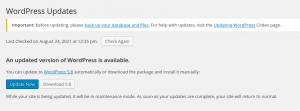
Wordpress Wordpress One Click WordPress Update

Out of date WordPress verion

When you see the message above: Update it.

Nowadays, with one-click update, it’s very easy to upgrade your WordPress Version.

Make sure your theme and plugins are compatible with this latest version of WordPress. If an update has been rolled out and it’s not a security update, I suggest you wait for your plugins and themes to become compatible before upgrading.

2. Keep Your WordPress Plugins Updated

As I mentioned above, WordPress releases an update to fix bugs and vulnerabilities, and this is the same for plugins. This is a really quick update to make:

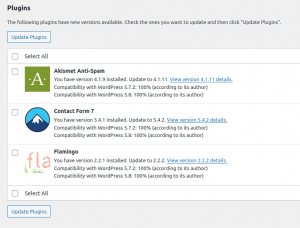
Wordpress Wordpress Guide to updating your WordPress Plugin

My 3 really simple steps:

  1. Log into your WordPress Site via wp-admin
  2. Click on ‘Plugins’ on the Left hand side
  3. Click the Update Now button for the vulnerable plugin

Many times, an out of date plugin or 3rd party script can create a security hole in your WordPress website causing it to become vulnerable.

In general you should always use plugins which are continually updated and have good support.

If you are using a plugin which has not been updated for a while, find an alternative to it. If you have an installed plugin, remove it.

Vulnerable WordPress Plugins

3. Keep Your WordPress Themes Updated

Yes! Even The Themes! Both plugins and themes are built on code. Mostly PHP to be specific. And, that code will eventually be outdated. When a theme (or plugin) is outdated, it’ll still work. Sure. However, it will be more prone to being exploited since it’s an easy way in for attackers.

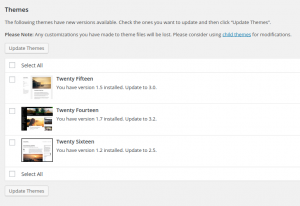
Make a consistent schedule to regularly check and download the latest updates of themes (and plugins).

These can be found directly on the WordPress dashboard on the “Updates” pages.

For more helpful tips try:

Wordpress Wordpress Guide to updating your WordPress Theme

Vulnerable WordPress Themes

But why is this so important?

Hackers created over 65 million new malware in the first quarter of 2019 alone!

Plugins are being updated all the time. For example, on a single day (24 Aug 2021) the following plugin vulnerabilities were all fixed and were ready to be updated:

  • Contact Form Entries < Version 1.2.1 – Reflected Cross-Site Scripting
  • TextME SMS < Version 1.8.9 – Authenticated Stored XSS
  • Live Scores for SportsPress < Version 1.9.1 – Authenticated Local File Inclusion
  • Live Scores for SportsPress < Version 1.9.1 – Reflected Cross-Site Scripting
  • SMTP Mail < Version 1.2 – Reflected Cross-Site Scripting (XSS)
  • SMTP Mail < Version 1.2.2 – Authenticated SQL Injections
  • Contact List < Version 2.9.42 – Reflected Cross-Site Scripting
  • Coupon Affiliates for WooCommerce < Version 4.11.0.2 – Reflected Cross-Site Scripting
  • Podlove Podcast Publisher < Version 3.5.6 – Unauthenticated SQL Injection
  • Recipe Card Blocks < Version 2.8.1 – Reflected Cross-Site Scripting
  • Recipe Card Blocks < Version 2.8.3 – Contributor+ Stored Cross-Site Scripting

As of June 2020 over 73% of the most popular WordPress installations were vulnerable. They were vulnerable to exploitable vulnerabilities that can be detected with free automated tools, within seconds.
It only takes a couple of minutes for a malicious attacker to run an automated tool that can discover these vulnerabilities and exploit them. This highlights the importance choosing the right WordPress web host that auto updates both plugins and WordPress.

The most common vulnerabilities

Arbitrary File Upload & File Viewing: Lack of file type and content filtering allows for upload of arbitrary files that can contain executable code which, once run, can do pretty much anything on a site. Instead of allowing only certain file source to be viewed (for example plugin templates) the lack of checks in the code allows the attacker to view the source of any file, including those with sensitive information such as wp-config.php

Privilege Escalation: Once the attacker has an account on the site, even if it’s only of the subscriber type, he can escalate his privileges to a higher level, including administrative ones.

SQL Injection: By not escaping and filtering data that goes into SQL queries, malicious code can be injected into queries and data deleted, updated or inserted into the database. This is one of the most common vulnerabilities.

Remote Code Execution (RCE): Instead of uploading and running malicious code, the attacker can run it from a remote location. The code can do anything, from hijacking the site to completely deleting it.

How Dogsbody can help

So, you maybe wondering ‘How will I know I’m vulnerable in the first place’.

The easiest way is to log into your WordPress site and take a look.


Feature image by mmayyer licensed Unsplash.

https://www.dogsbody.com/wp-content/uploads/unsplash.com_.photos.8_NI1WTqCGY.webp 700 1050 Ashley Holland https://www.dogsbody.com/wp-content/uploads/Dogsbody-site-logo-1.png Ashley Holland2022-10-14 10:00:382022-10-14 15:50:59Three Easy Ways To Secure Your WordPress Site

5 options for Ubuntu 18.04 EOL

1 Jul 2022/0 Comments/in Security/by Claire Christmas

Ubuntu 18.04 goes end of life in April 2023. Our usual EOL blog posts tend to be quite short and sharp, making sure that people are aware of software becoming insecure. When an operating system goes EOL there is usually a lot more to think about.

Here we look at your 5 options for Ubuntu 18.04 EOL.

  1. Do nothing (Not recommended)
  2. Build new infrastructure and move to the latest Ubuntu LTS release (Recommended)
  3. Perform an in-place upgrade
  4. Buy an annual subscription to Ubuntu Pro – Extended Security Maintenance (ESM)
  5. Just shut it down

Lets explore the pros and cons of each option.

1) Do Nothing (Not Recommended) Options for Ubuntu 18.04 EOL

By far the easiest of the options but could end up costing you more in the long run.  Dogsbody do not recommend this option.

Doing nothing mean you have a ticking time bomb on your infrastructure. Your 18.04 Infrastructure will no longer receive security updates for the Ubuntu base OS, critical software packages and infrastructure components as well as no security maintenance for high and critical CVEs. This will probably also cause Compliance issues (PCI), Software incompatibility and make your whole network more vulnerable.

Using this option will also mean that more work will be required when you upgrade your server in the future costing you more.

2) Build new infrastructure and move to the latest Ubuntu LTS release (Recommended)

Options for Ubuntu 18.04 EOLDogsbody always recommend this options as a clean and safe way to upgrade. It allows you to upgrade your hardware to the latest tech. (Suppliers may allow you a free cut over period to manage costs).

This options lets everyone involved test things fully without affecting production infrastructure .

Obviously the disadvantage is this is it is one of the more expensive options, not just because of the work involved but as you may have to pay for two set of hardware and support etc until you migrate from your old to your new infrastructure. Dogsbody offer a one month cross over period for all our maintenance customers 🙂 Also if you have multiple sites on the server (shared hosting) you need to update all sites to the new IP.

Ubuntu 22.04 LTS became available in April 2022 and is supported for 5 years with the end of their standard support in April 2027. We recommend installing the 22.04.1 release especially for production machines.

3) Perform an in-place upgrade

This may only be an option for certain infrastructure types. It can be cheaper than option 2 (and quicker) but only if it upgrades perfectly. This option gives you zero testing time which means there is a risk that this will not work and your infrastructure will be off line whilst you or your support services fix it live.

While in-place upgrades will result with you having a new operating system, you will likely inherit the (less secure) defaults from the old operating system. e.g. Networking in Ubuntu 14.04 is typically configured via the /etc/network/interfaces file.  Networking in Ubuntu 16.04 is typically configured via the netplan configuration files. An in-place upgrade from 16.04 to 18.04 would leave the old interfaces configuration in place which may work or may not depending on the setup you have.

We would certainly never recommend more than one in-place upgrade. Taking a single system from Ubuntu 14.04 -> 16.04 -> 18.04 and now 20.04 is a bad idea as it just leaves too many loose threads.

It also means your hardware will not be upgraded keeping you potentially on old, less efficient  hardware that may also cause you issues at a later date.

4) Buy an annual subscription to Ubuntu Pro – Extended Security Maintenance (ESM)

Ubuntu Pro and Ubuntu Pro (infra-only) are annual subscriptions from Canonical. They provide Security updates for Ubuntu LTS for an additional 5 years (April 2028). Including security coverage of the Main and Ubuntu Universe repositories (Ubuntu Pro only) for Critical, High and select Medium CVEs.

There is a possibility that other software and packages will drop their support for Ubuntu 18.04 so you may cause yourselves problems down the line if you plan to leave it the full 5 years.

Ubuntu Pro is an enterprise subscription charged per machine per year. Annual costs depend on your infrastructure type (desktop or server) and support requirements.

Security Patching Ubuntu LTS Ubuntu Pro (INFRA-ONLY) Ubuntu Pro
Ubuntu Main Repo 5 years 10 years 10 years
Ubuntu Universe Repo Best effort Best effort 10 years

5) Just shut it downOptions for Ubuntu 18.04 EOL

It’s good to take stock of your infrastructure sometimes, especially internal/pet projects that may have been left to languish.

Do you actually still need this infrastructure? Has it been replaced by something better? If so then you can always just shut it down.


About Ubuntu 22.04

Ubuntu 22.04 LTS release is supported for 5 years with the end of their standard support in April 2027.

Upgrading from Ubuntu 18.04 to Ubuntu 22.04 should, instantly, speed up your sites/infrastructure if you get it right.

It’s worth considering package changes between operating system versions. Some of the most common are…

  • Apache 2.4.29 -> Apache 2.4.52
  • MySQL 5.7 -> MySQL 8.0
  • PHP  7.2 -> PHP 8.1.2 (default)

More info in the Jammy Jellyfish Release Notes.

Dogsbody have a lot of customers who run Ubuntu 18.04 who we will be advising and helping move to the best option for their business. If you need help on deciding the best route for your upgrade please do contact us.

https://www.dogsbody.com/wp-content/uploads/beaver-gac8e01c32_1280.jpg 853 1280 Claire Christmas https://www.dogsbody.com/wp-content/uploads/Dogsbody-site-logo-1.png Claire Christmas2022-07-01 09:00:462023-02-09 10:44:575 options for Ubuntu 18.04 EOL
PHP 7.4 EOL

PHP 7.4 will go end of life on 28 November 2022

26 May 2022/0 Comments/in Security/by Claire Christmas

PHP 7.4 goes end of life (EOL) on the 28 November 2022 meaning known security flaws will no longer be fixed and sites are exposed to significant security vulnerabilities.

It is important to update them to a newer version. We would recommend updating to either:

  • 8.0 supported until 26 November 2023
  • 8.1 supported until 25 November 2024

New major PHP versions bring with it a number of new features and some incompatibilities. These should be tested before switching PHP versions in production environments.  You may need to get your developers to update some code, check plug-ins and app versions for the new PHP supportability:

  • Deprecated Features when migrating from 7.4.x to 8.0.x

WordPress 5.6 to 5.9 state that they have added “beta support” for PHP 8.0 and 8.1 however no one know when it will be out of beta status. Beta support means that the compatibility of WordPress with PHP is still being tested. We would usually advise not to use it on a production server until it is fully supported by WordPress.

Not sure what version your server is on? Maybe it’s time for a Server Audit so you have a full picture of your infrastructure – We produce a traffic light report telling you the good, the bad and the ugly…

Otherwise want a hand with your PHP upgrade? Get in touch!

https://www.dogsbody.com/wp-content/uploads/lifeline-ge081f87d3_1920.jpg 1280 1920 Claire Christmas https://www.dogsbody.com/wp-content/uploads/Dogsbody-site-logo-1.png Claire Christmas2022-05-26 14:36:332022-05-26 14:36:33PHP 7.4 will go end of life on 28 November 2022

Debian 9 “Stretch” goes End of Life (EOL) June 2022

5 Jan 2022/2 Comments/in Security/by Claire Christmas

On the 30 June 2022, Debian 9 “Stretch” goes End of Life (EOL). We recommend you upgrade to Debian 11 “Bullseye” (skipping Debian 10 if possible) which is supported until June 2026.

After this date there will be no security updates released for Debian 9 and servers will not be patched for any new vulnerabilities discovered.

Leaving old Debian 9 “Stretch” systems past 30 June 2022 leaves you at risk to:

  • Security vulnerabilities of the system in question
  • Software incompatibility
  • Compliance issues (PCI)
  • Poor performance and reliability
    and
  • Making your network more vulnerable as a whole

Debian 11 “Bullseye” Supports:

  • Apache 2.4.48
  • MariaDB 10.5
  • MySQL 8.0
  • PHP 7.4
  • Python 3, 3.9.1

Not sure where to start? Contact us to find out how we can help you.

https://www.dogsbody.com/wp-content/uploads/debian-9-stretch.jpg 1080 1920 Claire Christmas https://www.dogsbody.com/wp-content/uploads/Dogsbody-site-logo-1.png Claire Christmas2022-01-05 14:05:412022-01-05 14:05:41Debian 9 “Stretch” goes End of Life (EOL) June 2022
Page 1 of 512345

We are Dogsbody. We take the pain away from building, securing and maintaining IT infrastructure.

Find out how we can help your business

Everything we do is about security. Our team is our strength.

Get in touch

Latest thoughts and news

  • Five go to EMF Camp 2026
  • CAA Records Become Mandatory in 2027 – Is Your DNS Ready?
  • Our Trusted Suppliers after 15+ Years
  • Avoid Surprise AWS RDS Charges in 2026
  • A Season of Giving: Dogsbody Technology Charity Support 2025
Search Search

Useful links

  • About Us
  • Dogsbody News & Views
  • Contact Us

Linux & cloud services

  • Infrastructure Design
  • Infrastructure Build
  • In life Support
  • Infrastructure Audit
  • Penetration Testing
  • Hosting Services

In life support

  • Overview
  • Helpdesk support
  • Server management and monitoring

Careers

  • Working at Dogsbody
  • Write your own job description
© Copyright 2010-2026 Dogsbody Technology Ltd - Registered in England and Wales 07236558
  • Link to LinkedIn Link to LinkedIn Link to LinkedIn
  • Link to Facebook Link to Facebook Link to Facebook
  • Link to Bluesky Link to BlueskyLink to Bluesky
  • Link to Mastodon Link to MastodonLink to Mastodon
  • Link to Mail Link to Mail Link to Mail
  • Link to Rss Link to Rss Link to Rss
  • Contact us
  • Terms of use
  • Privacy policy
Scroll to top Scroll to top Scroll to top