
• Link to LinkedIn Link to LinkedIn Link to LinkedIn
  • Link to Facebook Link to Facebook Link to Facebook
  • Link to Bluesky Link to BlueskyLink to Bluesky
  • Link to Mastodon Link to MastodonLink to Mastodon
  • Link to Mail Link to Mail Link to Mail
  • Link to Rss Link to Rss Link to Rss
  • Dogsbody Technology Charity Support 2025
Contact us: 01276 818576
Dogsbody Technology
  • Emergency support
  • Infrastructure Services
    • Infrastructure Design
    • Infrastructure Build
    • Server management and monitoring
    • In-life Support
    • Pen Testing & Audit
    • Hosting Services
      • Plesk Hosting
      • VPS & Dedicated Servers
      • Tor Hosting
  • Happy Customers
  • About Us
  • Careers
    • Write your own job
  • News & Views
  • Contact Us
  • Menu Menu

WP-CLI – The Swiss Army Knife For WordPress

2 Jul 2019/0 Comments/in Technology/by Gary Rixon

WP-CLI (WordPress Command-Line Interface) is an open source project providing a command-line interface for managing WordPress sites. It is an extremely powerful and versatile tool, being able to carry out pretty much any operation that would normally be carried out via the web control panel, along with some additional functions that are only available via the CLI.

We use WP-CLI extensively here at Dogsbody Technology. It allows us to streamline and automate our WordPress set up and maintenance routine, so we thought we’d spread the word and get everybody else in on the action.

Installation

There are a few installation methods for WP-CLI, all which are documented here. We typically use the Phar installation method, which is as simple as:

curl -O https://raw.githubusercontent.com/wp-cli/builds/gh-pages/phar/wp-cli.phar
chmod +x wp-cli.phar
sudo mv wp-cli.phar /usr/local/bin/wp

Basic Usage

Unless otherwise instructed, WP-CLI will operate on the site contained in your current working directory. So if you want to work on a particular site you’ll need to “cd” to the installation directory before running your command, or alternatively you can pass the --path argument to WP-CLI. e.g.

wp --path=/var/www/dogsbody.com plugin install yoast

Creating a new site

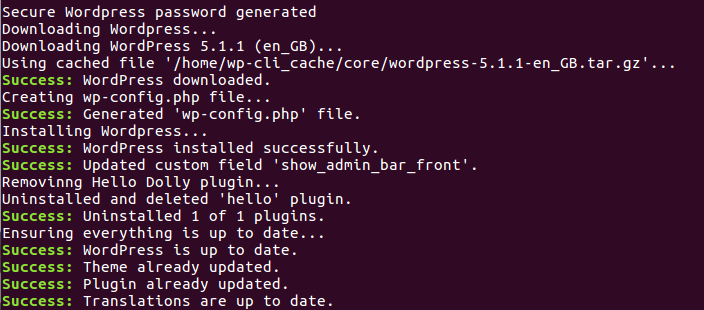
As well as managing existing sites, WP-CLI can also set up new ones. You’ll need to create a MySQL database and user, but beyond that WP-CLI can handle the rest. A basic site download/install procedure may look something like this:

wp core download --locale=en_GB
wp core config --dbname=database_name --dbuser=database_user --dbpass=database_password
wp core install --url=www.dogsbody.com --title="Dogsbody's Website" --admin_user=dogsbody --admin_password=admin_password --admin_email= --skip-email

Re-Writing a site

We often have customers wanting to take an existing site and re-configuring it to work on a new domain, or wanting to add HTTPS to an existing site and update everything to be served securely. WP-CLI makes this otherwise quite complex process much easier with with it’s search/replace feature:

wp search-replace 'https://www.dogsbodytechnology.com' 'https://www.dogsbody.com' --skip-columns=guid

(It’s advisable to skip the guid column as the guid of posts/pages within WordPress should never change).

In summary, WP-CLI is a very powerful tool and one that anybody working with WordPress sites often should at least be aware of. It can save you heaps of time and help you avoid mistakes.

If you want any help with WP-CLI, then please contact us. Or if you want some seriously fast and secure WordPress hosting, be sure to check out our WordPress hosting.


Tags: WordPress
Share this entry
  • Facebook Facebook Share on Facebook
  • Whatsapp Whatsapp Share on WhatsApp
  • Linkedin Linkedin Share on LinkedIn
  • Reddit Reddit Share on Reddit
  • Mail Mail Share by Mail
https://www.dogsbody.com/wp-content/uploads/wpcli3.png 310 704 Gary Rixon https://www.dogsbody.com/wp-content/uploads/Dogsbody-site-logo-1.png Gary Rixon2019-07-02 10:20:162019-06-21 16:34:35WP-CLI – The Swiss Army Knife For WordPress
You might also like
Alternative Map for WordPress
Adding Google Analytics tracking to WordPress via a plugin
How to set-up fail2ban for a WordPress site
Three Easy Ways To Secure Your WordPress Site
0 replies

Leave a Reply

Want to join the discussion?
Feel free to contribute!

Leave a Reply Cancel reply

Your email address will not be published. Required fields are marked *

We are Dogsbody. We take the pain away from building, securing and maintaining IT infrastructure.

Find out how we can help your business

Everything we do is about security. Our team is our strength.

Get in touch

Latest thoughts and news

  • Our Trusted Suppliers after 15+ Years
  • Avoid Surprise AWS RDS Charges in 2026
  • A Season of Giving: Dogsbody Technology Charity Support 2025
  • Wrapping Up 2025: Our Christmas Hours
  • PHP 8.1 will go end of life – 31 Dec 2025
Search Search

Useful links

  • About Us
  • Dogsbody News & Views
  • Contact Us

Linux & cloud services

  • Infrastructure Design
  • Infrastructure Build
  • In life Support
  • Infrastructure Audit
  • Penetration Testing
  • Hosting Services

In life support

  • Overview
  • Helpdesk support
  • Server management and monitoring

Careers

  • Working at Dogsbody
  • Write your own job description
© Copyright 2010-2026 Dogsbody Technology Ltd - Registered in England and Wales 07236558
  • Link to LinkedIn Link to LinkedIn Link to LinkedIn
  • Link to Facebook Link to Facebook Link to Facebook
  • Link to Bluesky Link to BlueskyLink to Bluesky
  • Link to Mastodon Link to MastodonLink to Mastodon
  • Link to Mail Link to Mail Link to Mail
  • Link to Rss Link to Rss Link to Rss
  • Contact us
  • Terms of use
  • Privacy policy
Link to: Proud to be part of the FSB Apprenticeship Report Link to: Proud to be part of the FSB Apprenticeship Report Proud to be part of the FSB Apprenticeship Report Link to: 5 benefits of IT managed services Link to: 5 benefits of IT managed services 5 benefits of IT managed services
Scroll to top Scroll to top Scroll to top